How to Run an Open Decks Night That Fills Itself
An Open Decks night runs on four moves. You post the night with its slot times, then share one sign-up link wherever your DJs already talk.
On the night, the screen behind the booth switches DJs on schedule. The next morning, you read the night report and book the follow-up. Everything below is the operating detail: slot math, the sign-up flow, handoffs, and what to check the morning after.
Pick the slot length first
Everything else follows from one decision: how long each DJ plays. Short slots put more names on the lineup, and every name brings friends through the door. Longer slots suit rooms where people settle in for the night.
A four-hour night with half-hour slots gives you eight names on the flyer. Hour-long slots give you four deeper sets. Pick the shape that fits your room, and let the form do the arithmetic — you set doors, close, and slot length, and the grid builds itself.
Order matters as much as length. Put first-timers early, while the room is warm but forgiving. Hold the middle of the night for the names you know can pull.
The closing slot is a reward — hand it to whoever filled the floor last time, and say so out loud. A night with a known shape is a night DJs plan around.
One link fills the grid
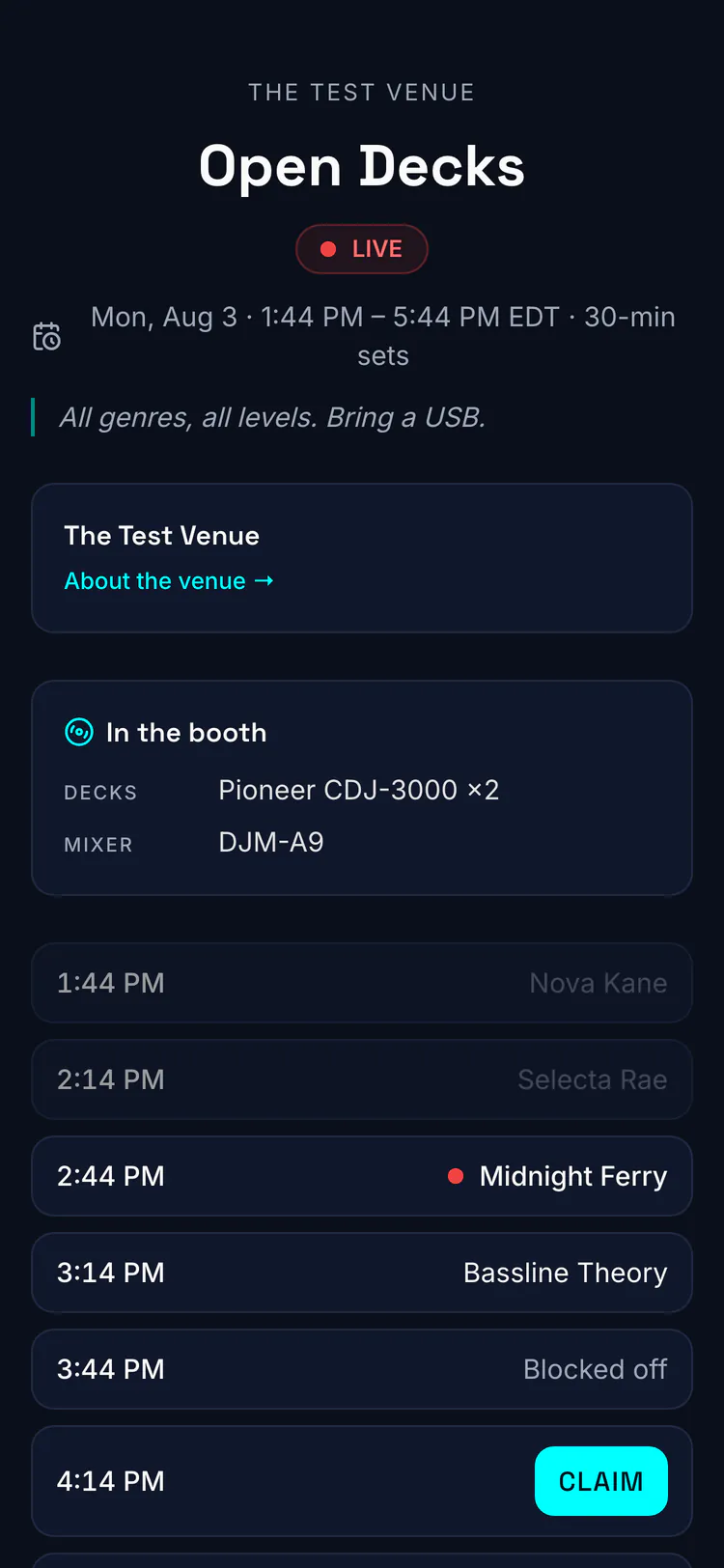
Posting the night creates a public sign-up page. Anyone with the link sees which slots are open and claims one — no group chat, no clipboard behind the bar, no DM roulette. When the grid fills, late names join a waitlist.
If a claimed slot opens back up, everyone on the waitlist gets an email and the first to grab it plays. Nobody is promoted silently, so nobody shows up to a slot they didn’t know they had.
Share the link where DJs already talk: the crew chats, your story, and a direct message to everyone who played last time. The same link also feeds your page in the Open Decks directory, where DJs go looking for a night near them. That is how strangers with record bags start appearing.
Your Open Decks dashboard also gives you a printable venue QR that always points at whatever your next night is. Print that one once, put it on the booth or the door, and the poster keeps working week after week without a reprint.
The DJ side is one screen: the night, the open slots, and a claim button. A DJ who has never used Hype Display can claim a slot from the dancefloor before the current set ends.
On the night, nobody stands at a laptop
The display switches at the printed time. The DJ playing gets the screen — their name, their branding, their QR. Between sets it shows who’s next, with the sign-up code for anyone in the room tempted to play the next one.
Set the house rules once and print them next to the QR: arrive one slot before you play, and changeovers happen on the beat. The booth belongs to whoever the screen names.
Most of the chaos in a DIY Open Decks night is nobody knowing whose turn it is — the screen answers that before anyone has to.
When a slot goes empty on the night, you fill it from your phone — hand it to a DJ from your roster, or let whoever is standing there claim it from the sign-up page. No one touches the resident’s laptop, and the room never stares at a desktop wallpaper while two people whisper over the mixer. The lineup guide covers moves, swaps and no-shows in detail.
After the night: the night report
When the night ends, the report is waiting: who played, and who claimed a slot but didn’t show. It also carries how many people scanned from the room, and what the night did for the DJs who played. Each DJ gets their own recap of their set the morning after.
The report is the argument for making the night weekly. Book back the names that pulled. Note the no-shows — one is a flat tire, a pattern is a policy.
Watch the waitlist too: when it is longer than the grid, demand is telling you to add a night, not more slots. The night-report guide shows every field.
What a venue needs on the account
You post nights from your venue’s account, and the venue page that comes with it is what lists your room where DJs are looking. Promoters who run nights at other people’s rooms can host them too.
What each venue plan includes lives on the pricing page.